To submit an article to SCA you must be a registered user and have been approved as an Author by an SCA Administrator. Once you are an Author you can create an article yourself. After a certain number of successful article submissions, Authors may have greater flexibility in publishing their articles themselves.
Once logged in you can use the top right user menu:
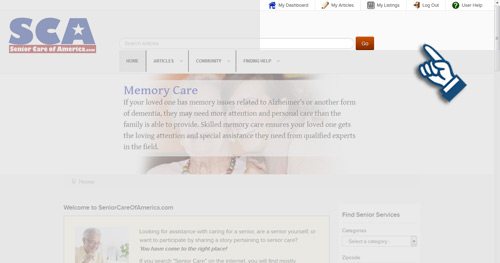
Select My Articles from the menu to access your Articles Dashboard:
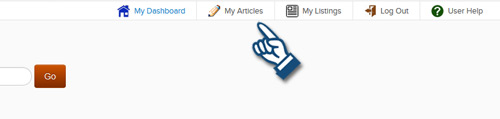
Articles Dashboard:
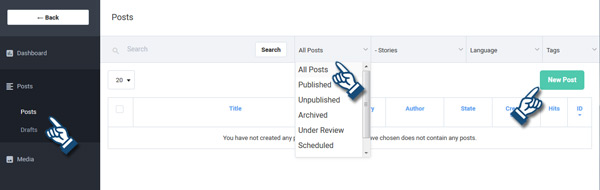
At your Articles Dashboard you will have access to your Posts (Articles) and any Drafts you've started. Sort the Post list to view All, Published, Under Review, etc. You have your own media folder to upload any images pertaining to the articles. A Shared Media fold is available for all users to "share" however we recommend uploading images only to your own media folder and not the shared folder for everyone to use. See important image sizing instructions below.
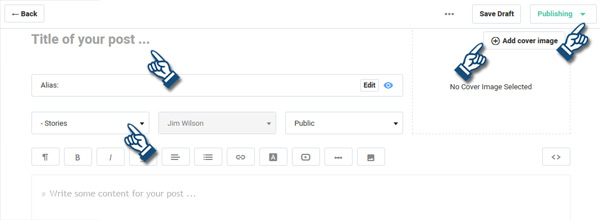
For a new article (post) use the "New Post" button, then complete and submit the "Create Article" form. Enter the Article Title. The "Alias" will auto-write itself upon saving, so leave it blank. Select the Category (under Stories) to publish the article to. You can select a "cover image" as a thumbnail and main article image. Enter the article text.
New Post (Create Article) form:
Adding the Author's name - Additional options:
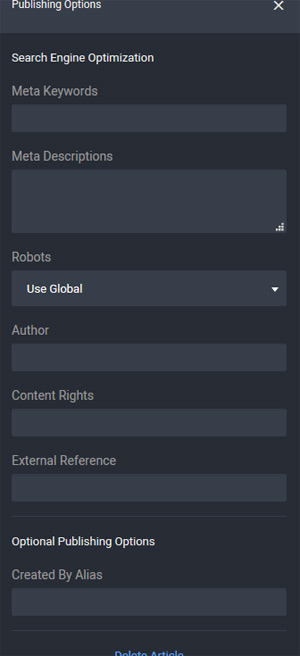
Use the three dots on the top menu to bring up the "More Options" flyout on the right. This is especially important when assigning the author's name. If you are not the original author of the article you need to enter the real author's name in the options flyout. We also recommend using a by-line in the article to the author and to the source of the original article. This is also necessary for us to verify all content submissions.
Review and Submit. If not ready to submit, you can save a Draft to finish later. If ready to submit, use the "Publishing" button at the top. You can suggest the publishing period or leave blank for continuous posting.
Once approved, your article will appear on SCA.
 Important Article Submission Rules
We do not permit plagiarism and make all attempts at honoring copyrights. It is your own responsibility to submit only articles that the original author/owner has allowed for distribution. You must provide links to the source for verification before the article can be approved for publishing. Any third party claims that an article has been submitted falsely indentifying another's writing as that of the submitter will be directed to you as the user who has submitted the article. You may submit articles by others only when properly identifying the author and source and abiding by any requirements for distribution.
If you are the author of the original article then you are permitted to provide a by-line and link to your website. All links will be verified and will be removed if found to be inaccurate. Please limit the number and size of any images. The same image will be used for both the Intro and Full Article images. Thumbnails will automatically be created from your "Add Cover Image" file. Main images will automatically be resized to 400px width max for full article images so please keepuploaded sizes not much grearter than 400px.
SCA Administration has editorial rights to all articles submitted to us. Prior to publishing SCA may make edits, remove some content and otherwise make the determination of the category/topic under which the article will be placed.
You may write [[editor notes]] at the beginning or end of your article to SCA Administration that will be removed from the article upon publishing. Please be sure to make these notes [[apparent to us]] by putting your notes in [[double square brackets]].
Articles not abiding by these rules will be rejected. Repeated offenses may result in the revocation of User rights. Decisions of SCA Administration are final.